
Entourage Link5.1 - App Store
You'll be able to see results in few seconds.
Publisher Description


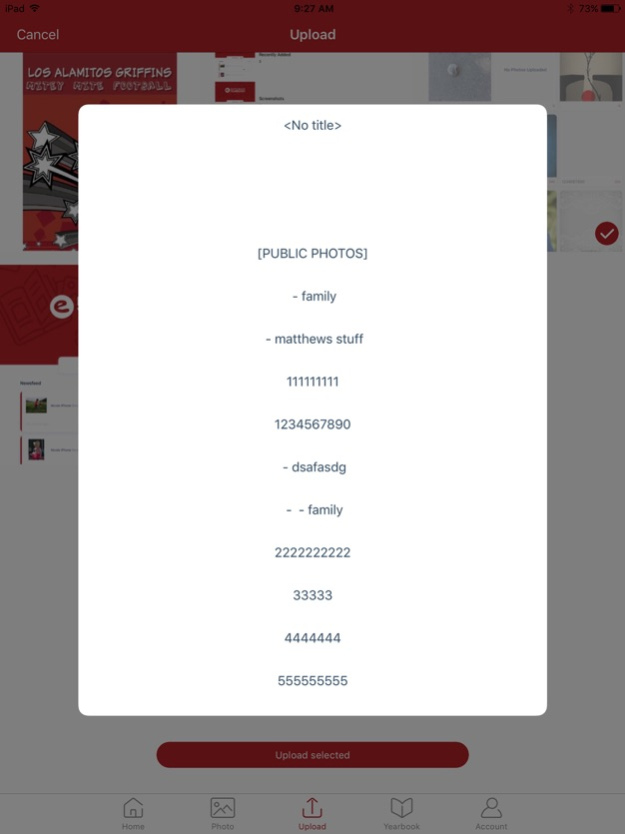

Link by Entourage Yearbooks provides an easy way to view, contribute, and manage your yearbook through your mobile device. Upload photos, view photo submissions from others, see progress toward your yearbook, and communicate with your yearbook staff. Entourage's Link application provides the easiest way to get more of your yearbook staff and your whole school involved in your yearbook program. This application is intended only for school's with active yearbook accounts with Entourage Yearbooks.
Use the Entourage Link application to submit photos to the yearbook, review status, add comments, and get more of the community involved in the yearbook creation process. After submitting your content, log onto Link by Entourage Yearbooks (http://link.entourageyearbooks.com) to see updates from the school, view content, and get status of how the creation of the yearbook is progressing. Entourage provides the most advanced system to compile, create, and publish yearbooks.
Version History Updates to the yearbook with refresh UI, and other bug fixes. 5.1 10/08/2024 Updates to the preview yearbook flipper, Forgot password link, and other bug fixes. 5.0.3 01/06/2024 Entourage LINK app has been updated with some bug fixes including: login help, newsfeed announcements, and yearbook flip book preview update. 5.0.2 10/21/2023 fix for login bug 5.0.1 12/11/2020 Fixed crash on iOS14 during photo upload; 5.0 10/13/2020 Custom albums from Photo now visible in "Upload" tab;
Select school feature now available on successful login too;
Media selection fixed, now selection state do not breaks after loading more. 4.0.7 11/05/2019 bug fixes. 4.0.6 03/16/2019 Photo uploading issue fixed 4.0.5 03/08/2019 Fixes and improvements; 4.0.4 03/01/2019 Bug fixes. 4.0.3 11/08/2018 Minor bug fixes to increase speed of image uploads. 4.0.2 10/12/2018 - Image uploaded sideways
- Video uploading fixed
- Yearbook viewing experience improved for landscape mode
- Now you can add non-member tag on a photo
And some other fixes and improvements which is not that visible. 4.0.1 08/09/2018 Thanks for using Entourage LINK!
This release features a :
- New User Interface!
- Compatiblity with iPhoneX and latest IOS!
- Performance improvements
- Bug Fixes 4 06/29/2018 Minor Bugs fixed. 3.0 11/29/2017 Minor Bugs fixed. 2.9 08/31/2017 Minor Bugs Resolved 2.8 05/19/2017 Fixed Minor bugs. 2.7 04/25/2017 Bugs resolved. 2.6 03/30/2017 Upgraded application to iOS 10. 2.5 09/30/2016 Improved Photo Upload Process. 2.4 09/23/2016 Bugs and Crashes Resolved. 2.3 09/13/2016 Crashes resolved 2.2 07/27/2016 Minor Bugs Fixed. 2.1 07/22/2016 - Added ability to view messages, submit messages.
- Added ability to take polls.
- General bug fixes and performance enhancements. 2.0 07/20/2016 Made a series of performance enhancements. Fixed a major bug with the latest iOS release. Added a new multi-image uploader to allow simulatneous photo uploads. Also enabled upload retry and more advanced data chunking 1.2 12/21/2015
About Entourage Link
The company that develops Entourage Link is ENTOURAGE IMAGING INC. The latest version released by its developer is 5.1.
To install Entourage Link on your iOS device, just click the green Continue To App button above to start the installation process. The app is listed on our website since 2026-10-14 and was downloaded 0 times. We have already checked if the download link is safe, however for your own protection we recommend that you scan the downloaded app with your antivirus. Your antivirus may detect the Entourage Link as malware if the download link is broken.
How to install Entourage Link on your iOS device:
- Click on the Continue To App button on our website. This will redirect you to the App Store.
- Once the Entourage Link is shown in the iTunes listing of your iOS device, you can start its download and installation. Tap on the GET button to the right of the app to start downloading it.
- If you are not logged-in the iOS appstore app, you'll be prompted for your your Apple ID and/or password.
- After Entourage Link is downloaded, you'll see an INSTALL button to the right. Tap on it to start the actual installation of the iOS app.
- Once installation is finished you can tap on the OPEN button to start it. Its icon will also be added to your device home screen.
Program Details
System requirements
Download information
Pricing
Version History
version 5.1
posted on 2026-10-14
Version History Updates to the yearbook with refresh UI, and other bug fixes. 5.1 10/08/2024 Updates to the preview yearbook flipper, Forgot password link, and other bug fixes. 5.0.3 01/06/2024 Entourage LINK app has been updated with some bug fixes including: login help, newsfeed announcements, and yearbook flip book preview update. 5.0.2 10/21/2023 fix for login bug 5.0.1 12/11/2020 Fixed crash on iOS14 during photo upload; 5.0 10/13/2020 Custom albums from Photo now visible in "Upload" tab;
Select school feature now available on successful login too;
Media selection fixed, now selection state do not breaks after loading more. 4.0.7 11/05/2019 bug fixes. 4.0.6 03/16/2019 Photo uploading issue fixed 4.0.5 03/08/2019 Fixes and improvements; 4.0.4 03/01/2019 Bug fixes. 4.0.3 11/08/2018 Minor bug fixes to increase speed of image uploads. 4.0.2 10/12/2018 - Image uploaded sideways
- Video uploading fixed
- Yearbook viewing experience improved for landscape mode
- Now you can add non-member tag on a photo
And some other fixes and improvements which is not that visible. 4.0.1 08/09/2018 Thanks for using Entourage LINK!
This release features a :
- New User Interface!
- Compatiblity with iPhoneX and latest IOS!
- Performance improvements
- Bug Fixes 4 06/29/2018 Minor Bugs fixed. 3.0 11/29/2017 Minor Bugs fixed. 2.9 08/31/2017 Minor Bugs Resolved 2.8 05/19/2017 Fixed Minor bugs. 2.7 04/25/2017 Bugs resolved. 2.6 03/30/2017 Upgraded application to iOS 10. 2.5 09/30/2016 Improved Photo Upload Process. 2.4 09/23/2016 Bugs and Crashes Resolved. 2.3 09/13/2016 Crashes resolved 2.2 07/27/2016 Minor Bugs Fixed. 2.1 07/22/2016 - Added ability to view messages, submit messages.
- Added ability to take polls.
- General bug fixes and performance enhancements. 2.0 07/20/2016 Made a series of performance enhancements. Fixed a major bug with the latest iOS release. Added a new multi-image uploader to allow simulatneous photo uploads. Also enabled upload retry and more advanced data chunking 1.2 12/21/2015
version 5.1
posted on 2024-10-08
Updates to the yearbook with refresh UI, and other bug fixes.
version 5.1
posted on 2024-10-08
Oct 8, 2024
Version 5.1
Updates to the yearbook with refresh UI, and other bug fixes.
version 5.0.1
posted on 2020-12-11
Dec 11, 2020 Version 5.0.1
fix for login bug
Disclaimer
Official App Store Link
We do not host Entourage Link on our servers. We did not scan it for viruses, adware, spyware or other type of malware. This app is hosted by Apple and passed their terms and conditions to be listed there. We recommend caution when installing it.
The App Store link for Entourage Link is provided to you by apps112.com without any warranties, representations or guarantees of any kind, so access it at your own risk.
If you have questions regarding this particular app contact the publisher directly. For questions about the functionalities of apps112.com contact us.
